Your customers reorder at the right time, from your very first order.
FluXence is a Shopify app for stores that sell products people buy again: coffee, tea, pet food, supplements, cosmetics. It emails each customer a reorder reminder when their product is about to run out, with a cart that is already filled.
Install on ShopifyFree plan included. Paid plans start with a 14-day free trial.
How it works
Install from the Shopify App Store
FluXence reads your orders from the last twelve months and suggests a reorder delay for each product.
Check the delays, turn sending on
Change a delay only if you know your products better. Send yourself a test email to see exactly what your customers will receive.
Your customers come back on time
Each customer gets a reminder when their product runs low, with a ready-made cart. Your dashboard shows the revenue it brings back.
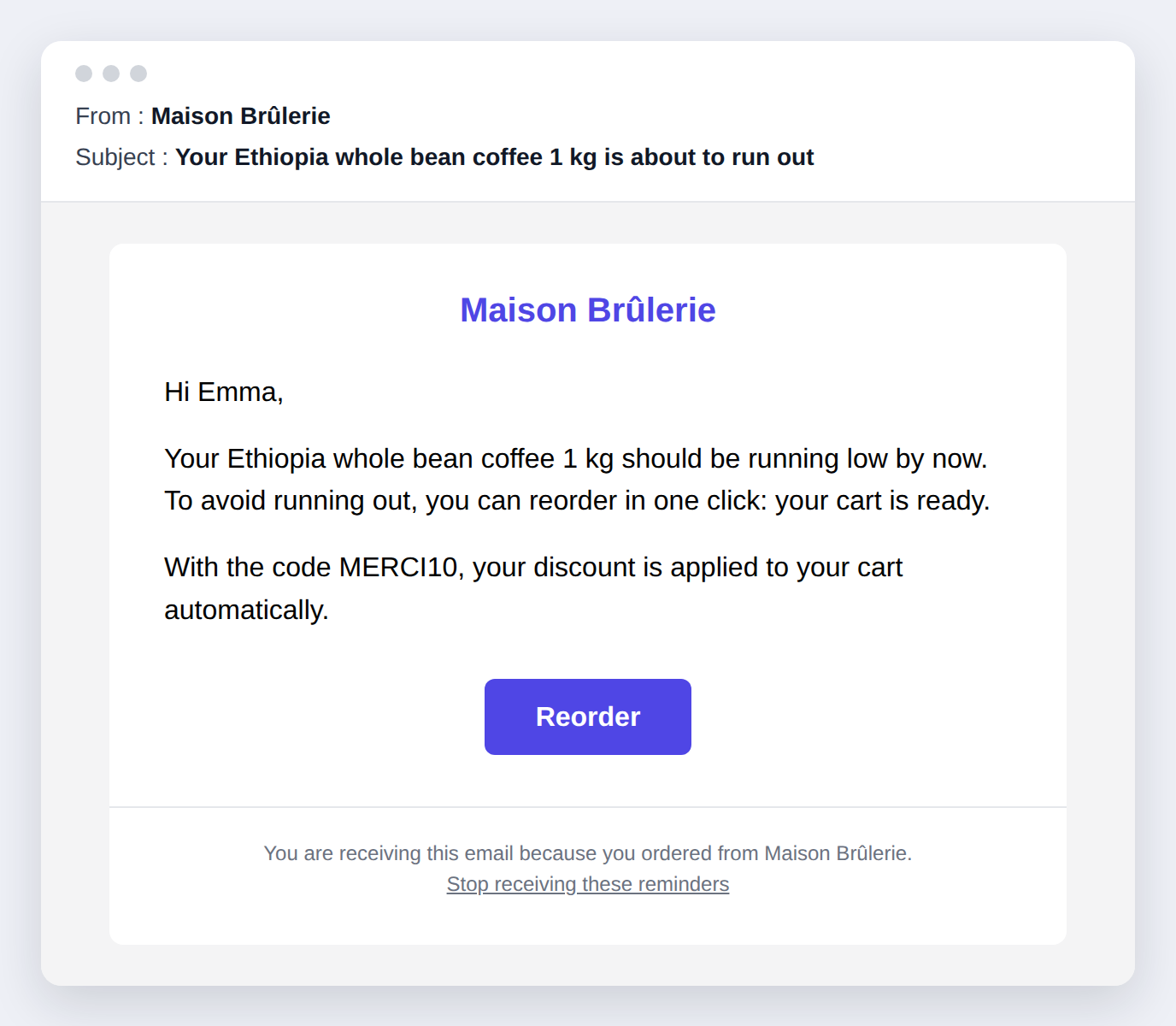
The email your customers receive
Short, clear and in your customer's language. The button opens a cart that already holds the product, with your discount code applied if you offer one. It carries your store's name, logo and colours.
Why FluXence
Works from day one
Sensible reorder delays per product family, refined by each customer's real purchase rhythm. No minimum number of customers or months of history.
Nothing to configure
Install, check the suggested delays, turn sending on. Adjust a product by hand only if you want to.
One-click reorder
The reminder leads straight to checkout with the product in the cart, and your discount code applied if you offer one.
Emails in your customer's language
Reminders are written natively in English, French, Spanish, Italian and German, sent in each customer's language, with your logo and colours.
Respectful by design
Marketing consent is honoured, every email has an unsubscribe link, and each reminder is sent once. Data is hosted in the European Union and deleted when you uninstall.
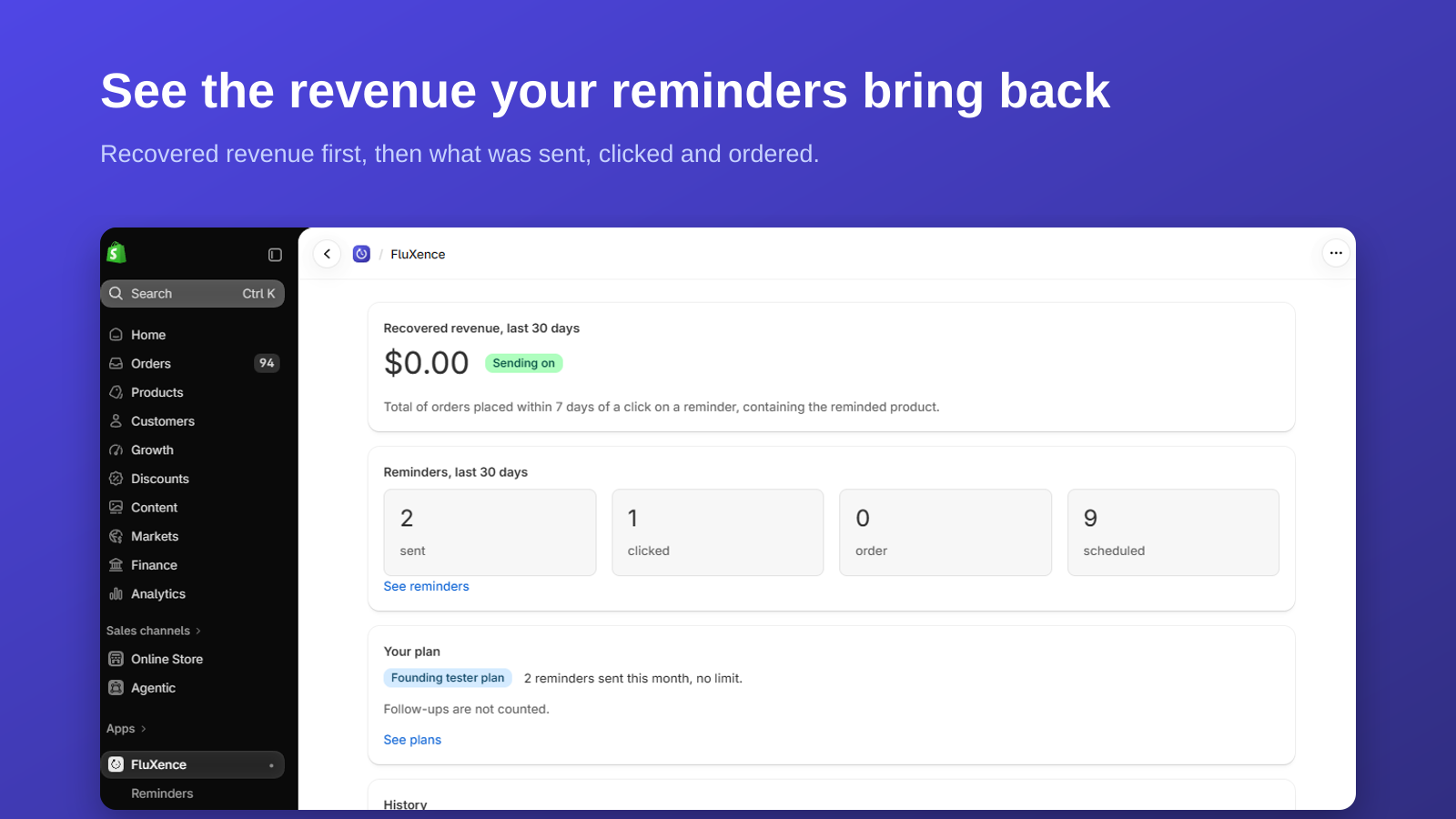
Recovered revenue first
Your dashboard opens on the revenue your reminders brought back, then on what was sent, clicked and ordered.
Plans
Free
$0
100 reminders per month
Starter
$19 / month
1,500 reminders per month
Growth
$49 / month
6,000 reminders per month
Pro
$99 / month
Unlimited reminders, priority support
Every plan includes every feature. Paid plans start with a 14-day free trial and are billed through your Shopify invoice.
Frequently asked questions
When is a reminder sent?
When the product a customer bought should be running low. FluXence starts from a sensible delay for each product family and adjusts it to each customer's own buying rhythm as orders come in. You can change the delay of any product.
Who receives the reminders?
Only customers who accepted your marketing emails. Every reminder has an unsubscribe link, and a customer who unsubscribes receives no more reminders.
Do I have to offer a discount?
No. If you enter a discount code in the settings, it is applied to the cart automatically. Without one, the reminder simply leads to a ready-made cart.
What happens when I reach my plan's monthly limit?
No more reminders are sent that month. You can switch plans at any time from the app; billing goes through your Shopify invoice. Follow-up emails do not count towards the limit.
Which languages are the emails written in?
English, French, Spanish, Italian and German, written natively. Each customer gets the email in their own language, or in your store's language if theirs is not one of these, and English otherwise. You can rewrite every text in the settings.
What happens to the data if I uninstall?
Your store's data is deleted. It is hosted in the European Union and is never sold or shared for advertising.
Start with the free plan
100 reminders per month, every feature included, nothing to pay. Upgrade only when the reminders bring in more than they cost.
Install on ShopifyFree plan included. Paid plans start with a 14-day free trial.